机器人关节标定
Kuavo 4 Pro 零点标定
工装块
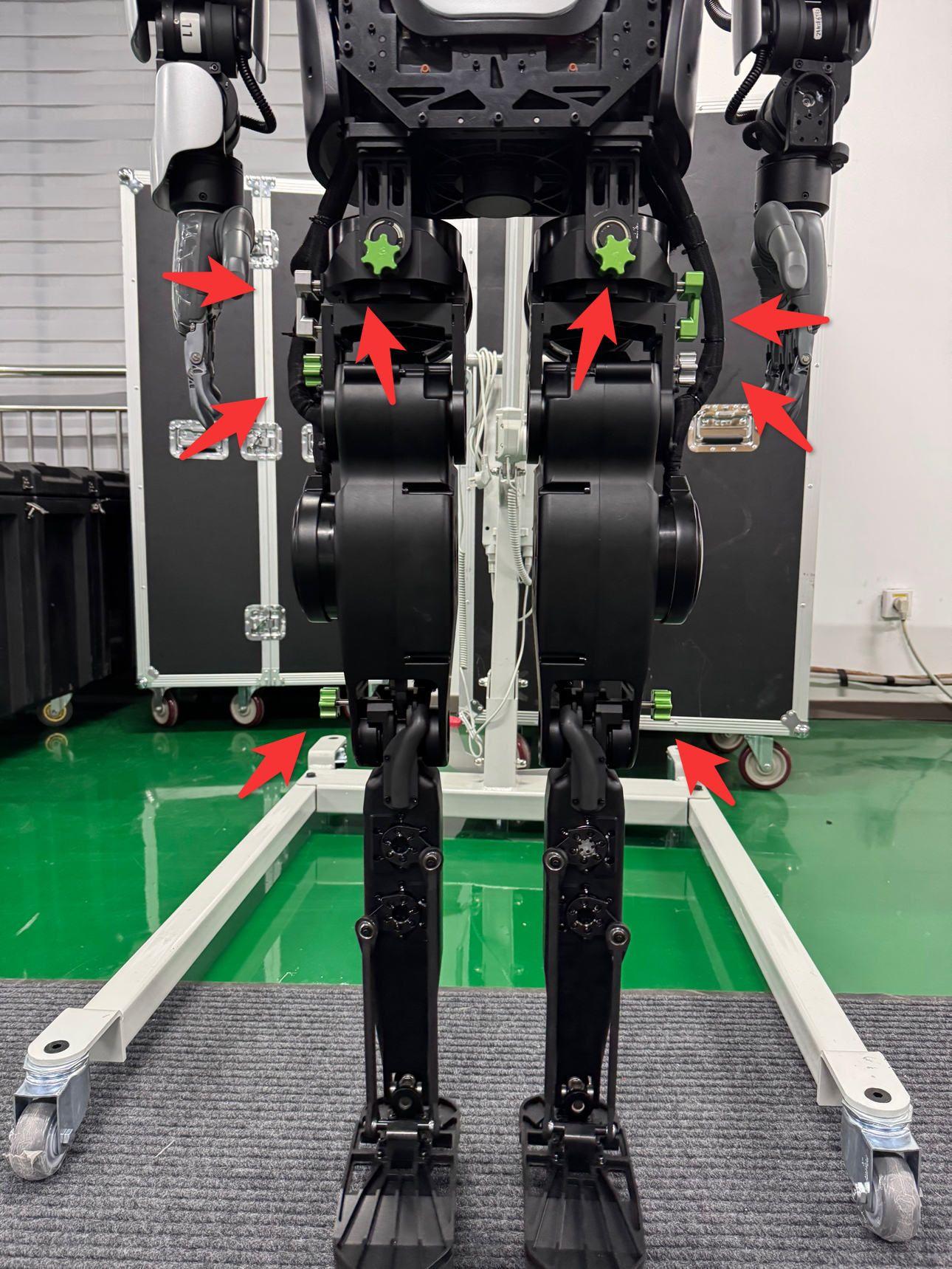
一共需要 10 个工装块,使用时两两为一组对称。
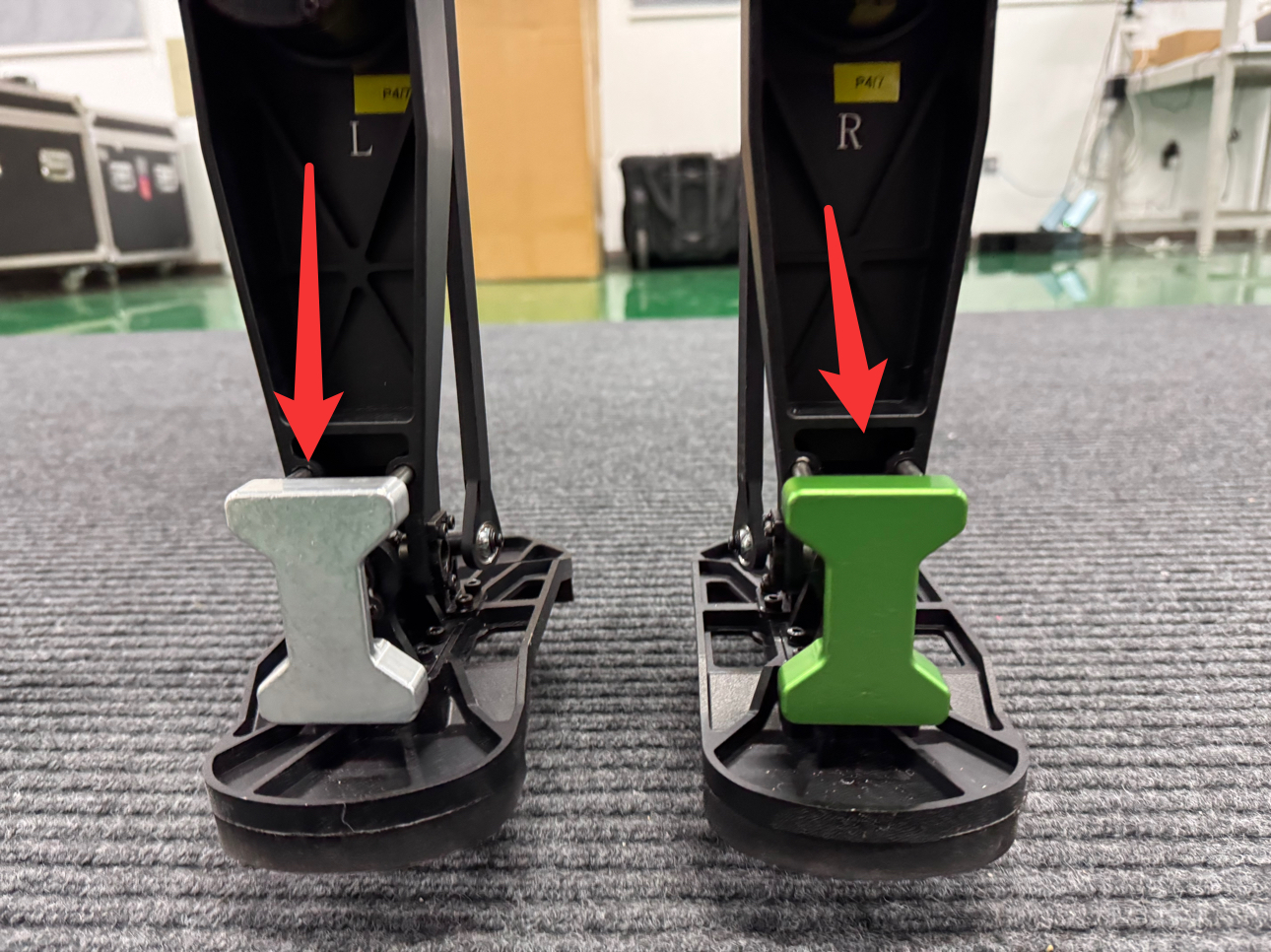
工装块的安装
安装顺序为从下到上,按照图中的孔位插入工装,插入后如右图所示。
腿部零点标定
安装完工装后,通过 SSH 连接到机器人,摆正机器人头部以及手臂,在远程的 SSH 连接终端中输入下列命令:
cd ~/kuavo-ros-opensource
sudo su
source devel/setup.bash
roslaunch humanoid_controllers load_kuavo_real.launch cali:=true cali_leg:=true
程序运行的终端会一直存在输出,需要注意查看。如有必要可以拖动终端一侧的滑动栏上下滑动,在之前的输出中查找是否存在相关输出。腿部电机使能后,终端会有如下代码块的输出:
0000017193: Joint 1, Slave 1 actual position 9.6411132,Encoder 63184.0000000
0000017195: Rated current 30.0000000
0000017197: Joint 1, Slave 1 转向= 6
0000017209: Read Joint 1, Slave 1 init kp value 220, and set kp value 220 successfully
0000017209: Read Joint 1, Slave 1 init kd value 2979, and set kd value 2979 successfully
0000017211: Joint 2, Slave 2 actual position 25.7645874,Encoder 93806.0000000
0000017213: Rated current 20.0000000
0000017215: Joint 2, Slave 2 转向= 6
0000017227: Read Joint 2, Slave 2 init kp value 100, and set kp value 100 successfully
0000017227: Read Joint 2, Slave 2 init kd value 5376, and set kd value 5376 successfully
0000017229: Joint 3, Slave 3 actual position 18.2463684,Encoder 66433.0000000
0000017231: Rated current 40.0000000
0000017233: Joint 3, Slave 3 转向= 6
0000017245: Read Joint 3, Slave 3 init kp value 224, and set kp value 224 successfully
0000017245: Read Joint 3, Slave 3 init kd value 10794, and set kd value 10794 successfully
0000017247: Joint 4, Slave 4 actual position -58.7013244,Encoder -384705.0000000
0000017249: Rated current 40.0000000
0000017251: Joint 4, Slave 4 转向= 6
0000017263: Read Joint 4, Slave 4 init kp value 224, and set kp value 224 successfully
0000017263: Read Joint 4, Slave 4 init kd value 10794, and set kd value 10794 successfully
0000017265: Joint 5, Slave 5 actual position 34.8202514,Encoder 456396.0000000
0000017267: Rated current 6.1000000
0000017269: Joint 5, Slave 5 转向= 6
0000017281: Read Joint 5, Slave 5 init kp value 58, and set kp value 58 successfully
0000017281: Read Joint 5, Slave 5 init kd value 3136, and set kd value 3136 successfully
0000017283: Joint 6, Slave 6 actual position -44.3365478,Encoder -581128.0000000
0000017285: Rated current 6.1000000
0000017287: Joint 6, Slave 6 转向= 6
0000017299: Read Joint 6, Slave 6 init kp value 58, and set kp value 58 successfully
0000017299: Read Joint 6, Slave 6 init kd value 3136, and set kd value 3136 successfully
0000017301: Joint 7, Slave 7 actual position 3.5322570,Encoder 23149.0000000
0000017303: Rated current 30.0000000
0000017305: Joint 7, Slave 7 转向= 6
[ INFO ][2026-06-29-09:01:24][/mobile_manipulator_controllers_node]: [MobileManipulatorController] Waiting for observation...
0000017317: Read Joint 7, Slave 7 init kp value 220, and set kp value 220 successfully
0000017317: Read Joint 7, Slave 7 init kd value 2979, and set kd value 2979 successfully
0000017319: Joint 8, Slave 8 actual position 16.0600891,Encoder 58473.0000000
0000017321: Rated current 20.0000000
0000017323: Joint 8, Slave 8 转向= 6
0000017335: Read Joint 8, Slave 8 init kp value 100, and set kp value 100 successfully
0000017335: Read Joint 8, Slave 8 init kd value 5376, and set kd value 5376 successfully
0000017337: Joint 9, Slave 9 actual position 34.8082580,Encoder 126733.0000000
0000017339: Rated current 40.0000000
0000017341: Joint 9, Slave 9 转向= 6
0000017353: Read Joint 9, Slave 9 init kp value 224, and set kp value 224 successfully
0000017353: Read Joint 9, Slave 9 init kd value 10794, and set kd value 10794 successfully
0000017355: Joint 10, Slave 10 actual position -53.2159423,Encoder -348756.0000000
0000017357: Rated current 40.0000000
0000017359: Joint 10, Slave 10 转向= 6
0000017371: Read Joint 10, Slave 10 init kp value 224, and set kp value 224 successfully
0000017371: Read Joint 10, Slave 10 init kd value 10794, and set kd value 10794 successfully
0000017373: Joint 11, Slave 11 actual position -28.2884979,Encoder -370783.0000000
0000017375: Rated current 6.1000000
0000017377: Joint 11, Slave 11 转向= 6
0000017389: Read Joint 11, Slave 11 init kp value 58, and set kp value 58 successfully
0000017389: Read Joint 11, Slave 11 init kd value 3136, and set kd value 3136 successfully
0000017391: Joint 12, Slave 12 actual position 39.4952392,Encoder 517672.0000000
0000017393: Rated current 6.1000000
0000017395: Joint 12, Slave 12 转向= 6
0000017407: Read Joint 12, Slave 12 init kp value 58, and set kp value 58 successfully
0000017407: Read Joint 12, Slave 12 init kd value 3136, and set kd value 3136 successfully
0000017410: Joint 13, Slave 13 actual position 20.7485046,Encoder 75543.0000000
0000017412: Rated current 30.0000000
0000017414: Joint 13, Slave 13 转向= 6
0000017425: Read Joint 13, Slave 13 init kp value 220, and set kp value 586 successfully
0000017425: Read Joint 13, Slave 13 init kd value 2979, and set kd value 4100 successfully
0000017427: Joint 14, Slave 14 actual position -3.7872619,Encoder -13789.0000000
0000017429: Rated current 30.0000000
0000017431: Joint 14, Slave 14 转向= 6
0000017443: Read Joint 14, Slave 14 init kp value 220, and set kp value 586 successfully
0000017443: Read Joint 14, Slave 14 init kd value 2979, and set kd value 4100 successfully
0000017443: App setup down!
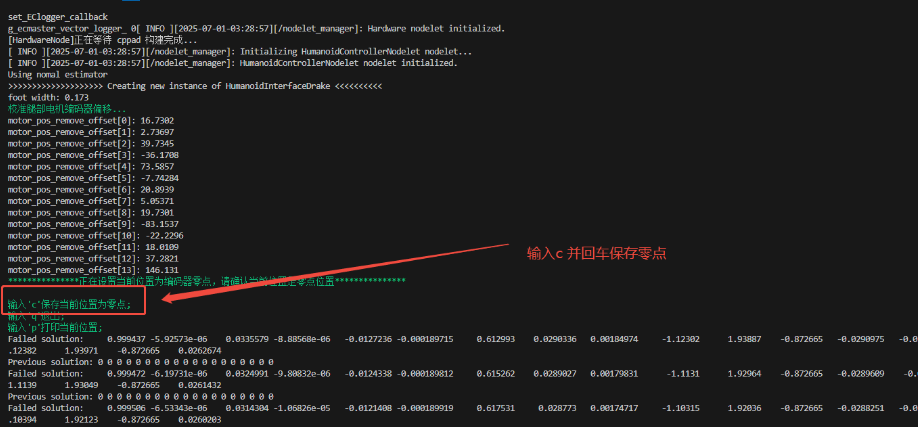
其中 Slave xx actual position 之后的数值为当前零点。
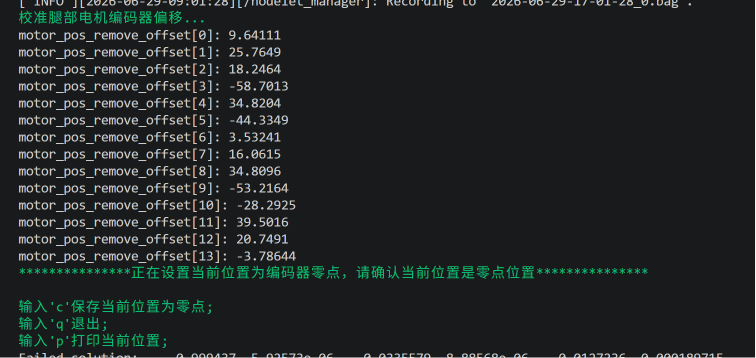
- 跟随提示操作,按
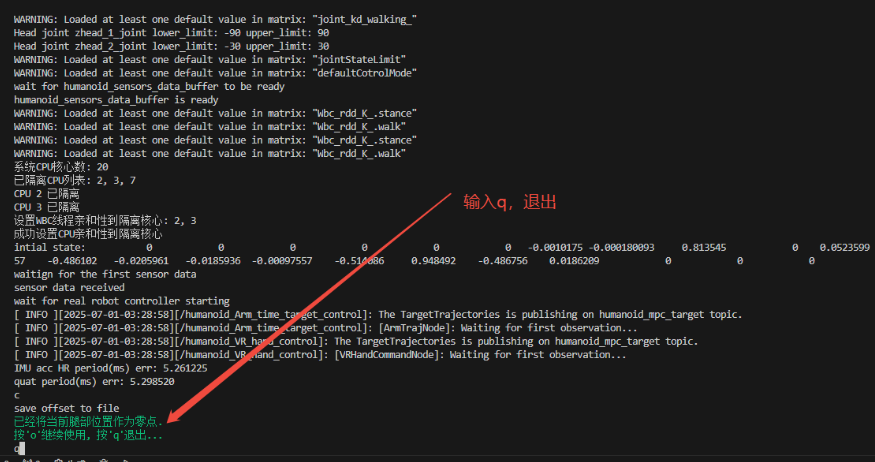
c加回车,保存腿部当前位置作为零点。随后,按q加回车退出程序,此时腿部零点标定完成,拔下工装便可正常使用。
手臂自动标定
新建一个终端,输入下列命令(注意:后续"标定手臂"和"标定头部"的操作均在此终端进行):
cd ~/kuavo-ros-opensource
sudo su
source devel/setup.bash
# 以校准模式启动
roslaunch humanoid_controllers load_kuavo_real.launch cali:=true cali_arm:=true
使用移位机将机器人拉高,并按下图大致将手臂和头部摆正。
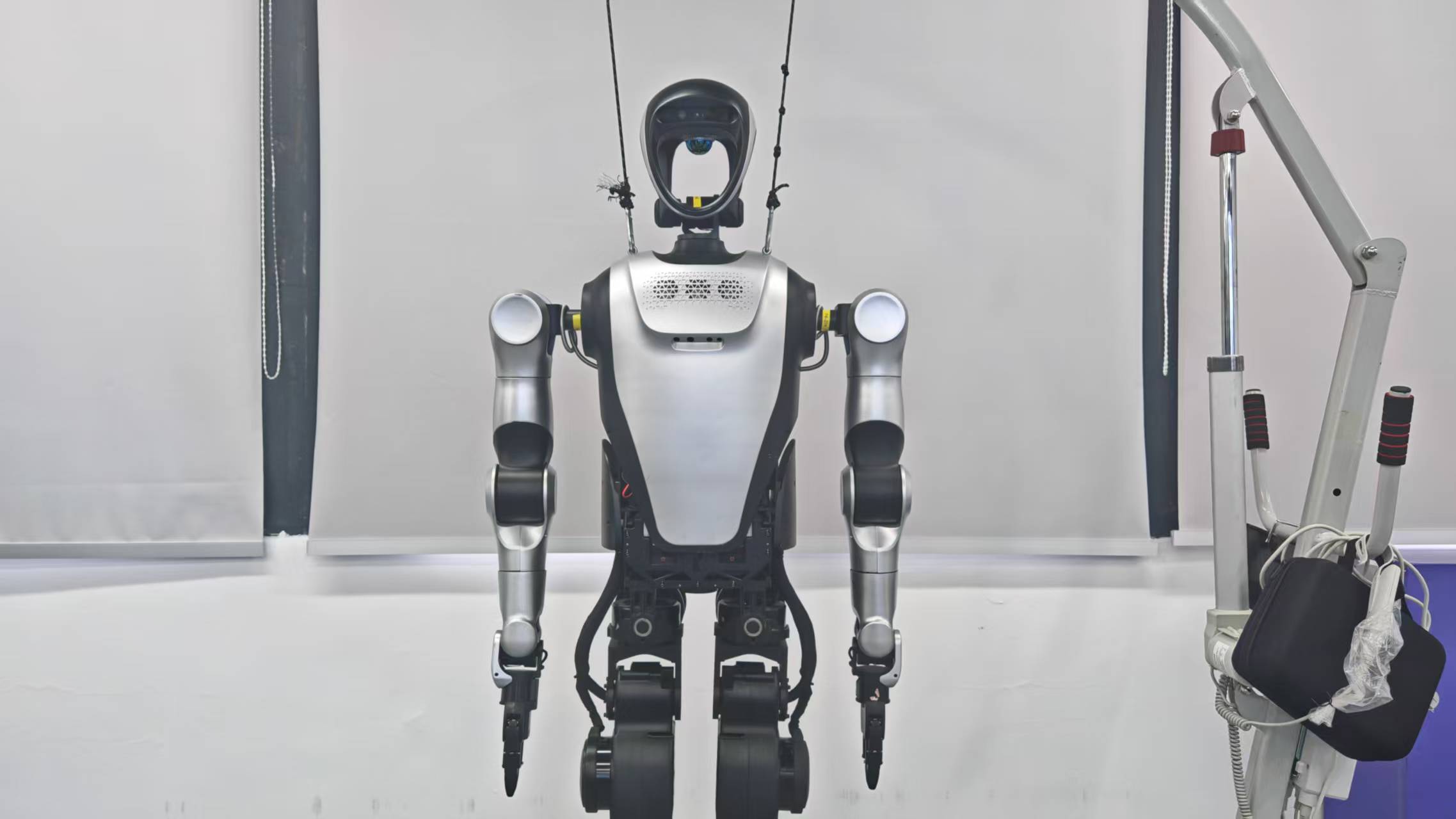
注意:由于标定过程手臂会在一定范围内运动,所以开始手臂标定前,需要给机器人前后各预留大概一米的活动空间。 等待机器人将腿伸直后,根据提示依次输入
a、1、1,每次输入完成后都需按下回车。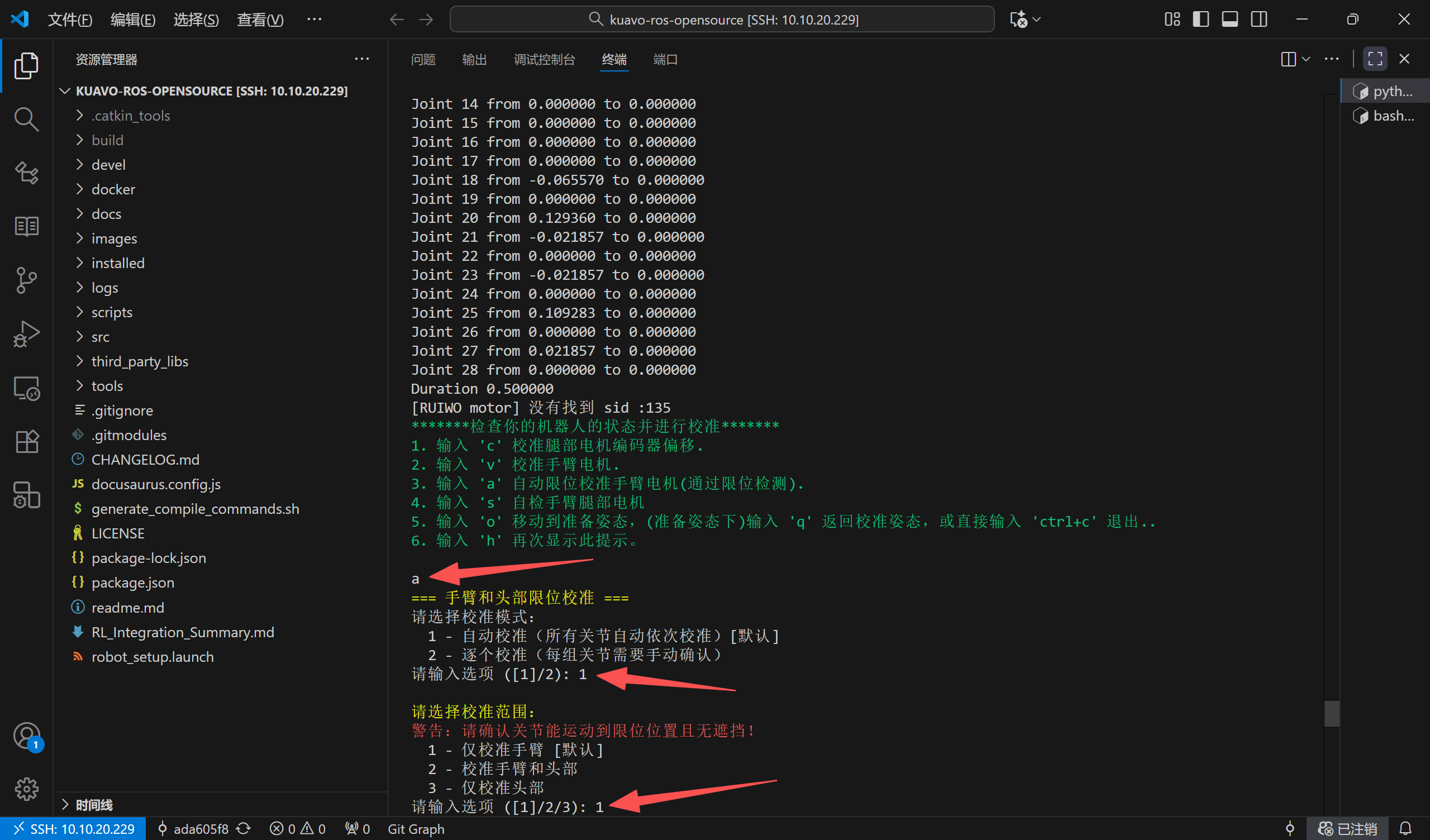
等待机器人手臂标定完成并复位,终端会弹出提示,按
s并回车即可保存手臂零点。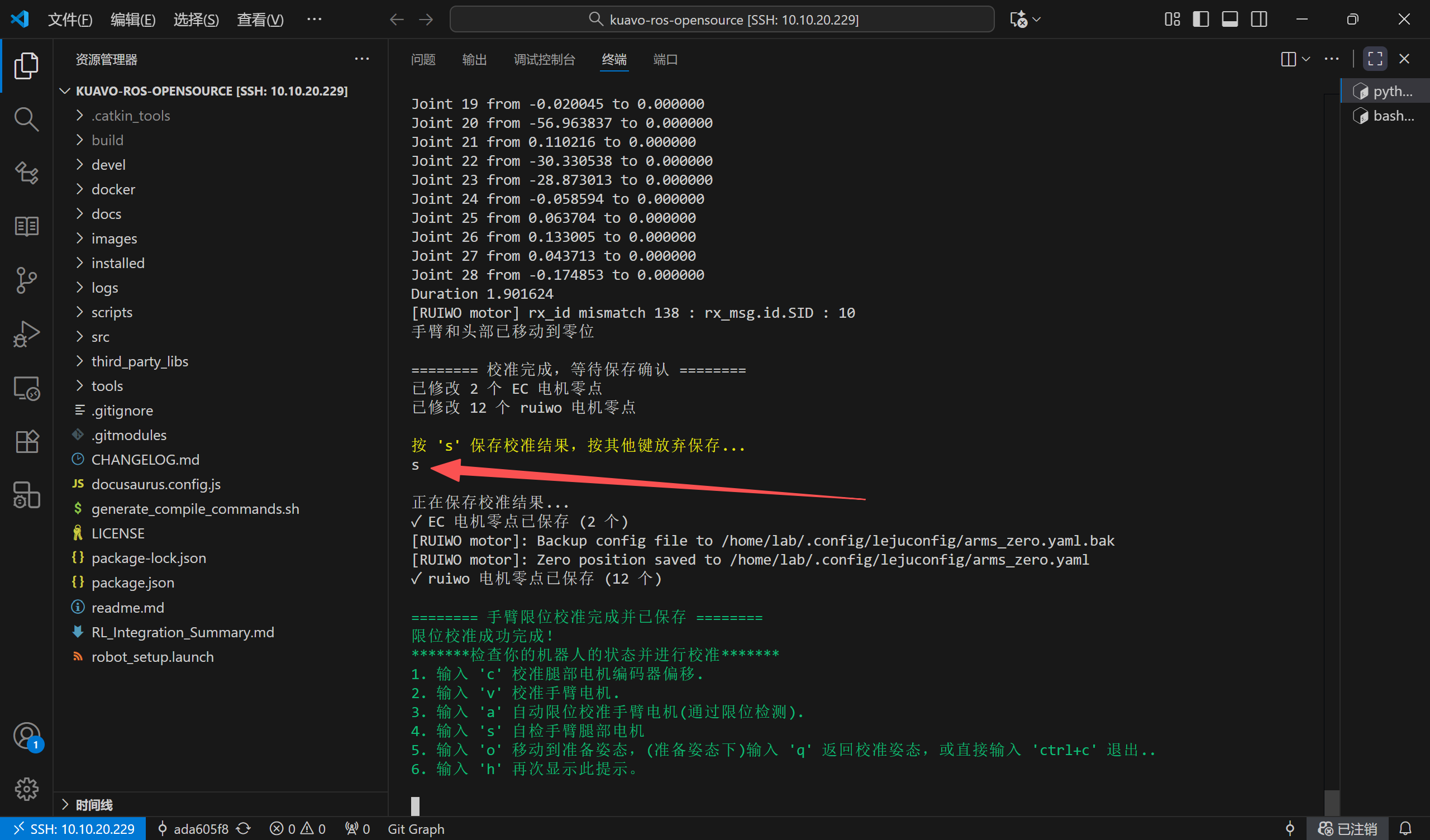
头部自动标定
移位机下降至机器人双足稳定接触地面,如下图:
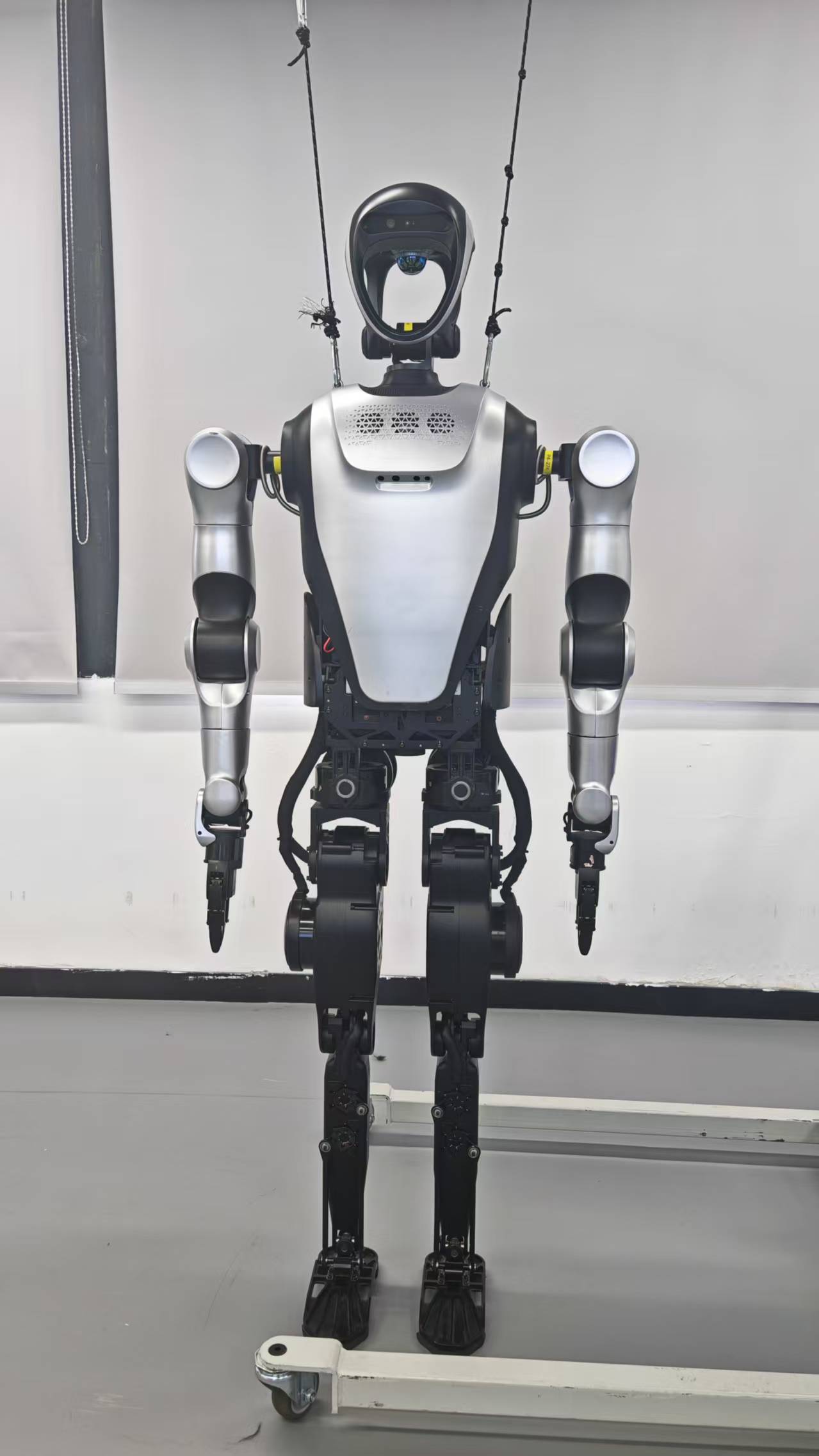
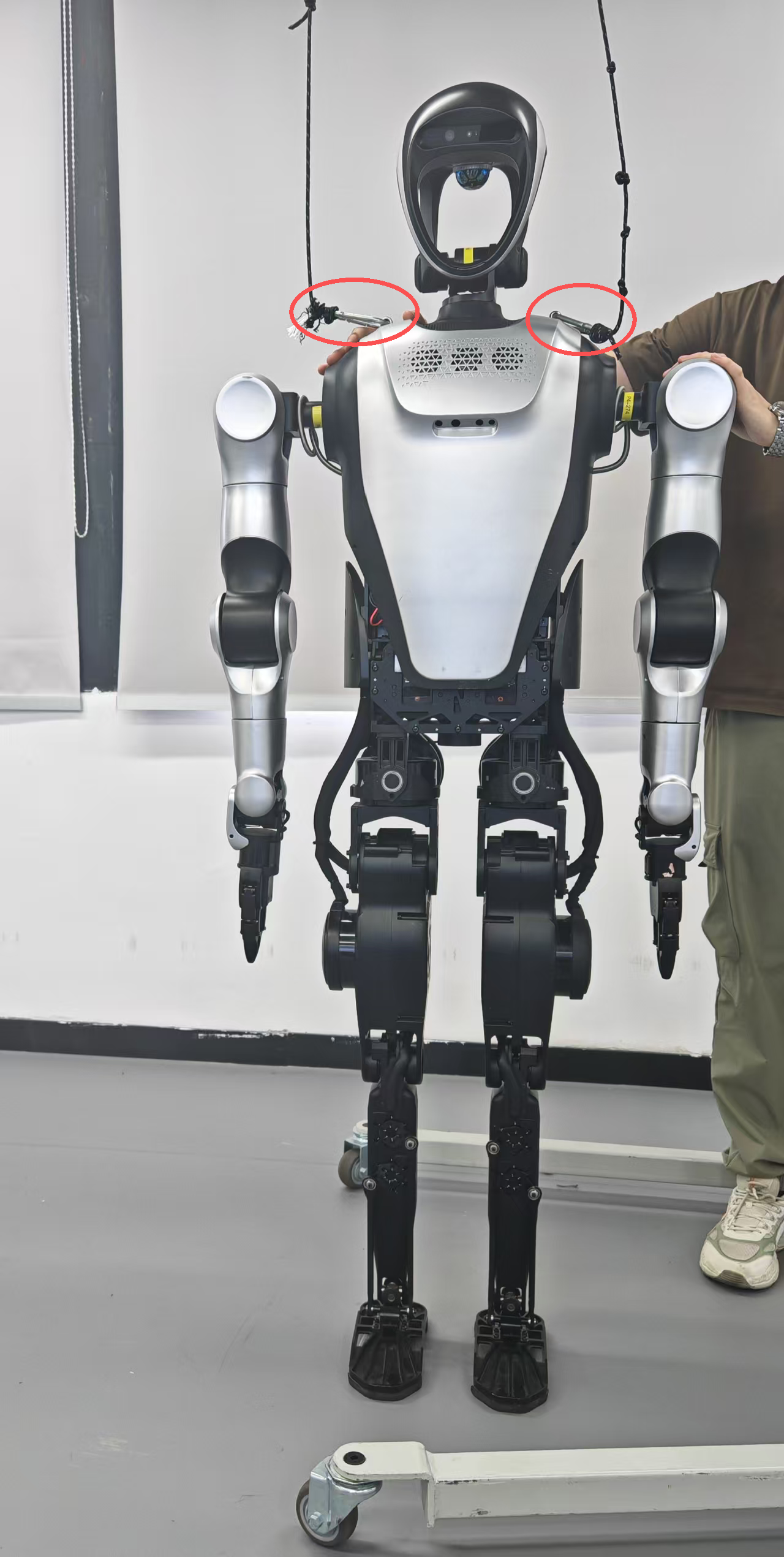
用手在后面拖住机器人,移位机继续下降,令机器人双肩的挂绳环扣接近水平,如下图:
若已退出或新建终端,可在终端输入下列命令启动;后续操作均为根据提示依次输入
a、1、3(每次输入完成后都需按下回车):cd ~/kuavo-ros-opensource
sudo su
source devel/setup.bash
# 以校准模式启动
roslaunch humanoid_controllers load_kuavo_real.launch cali:=true cali_arm:=true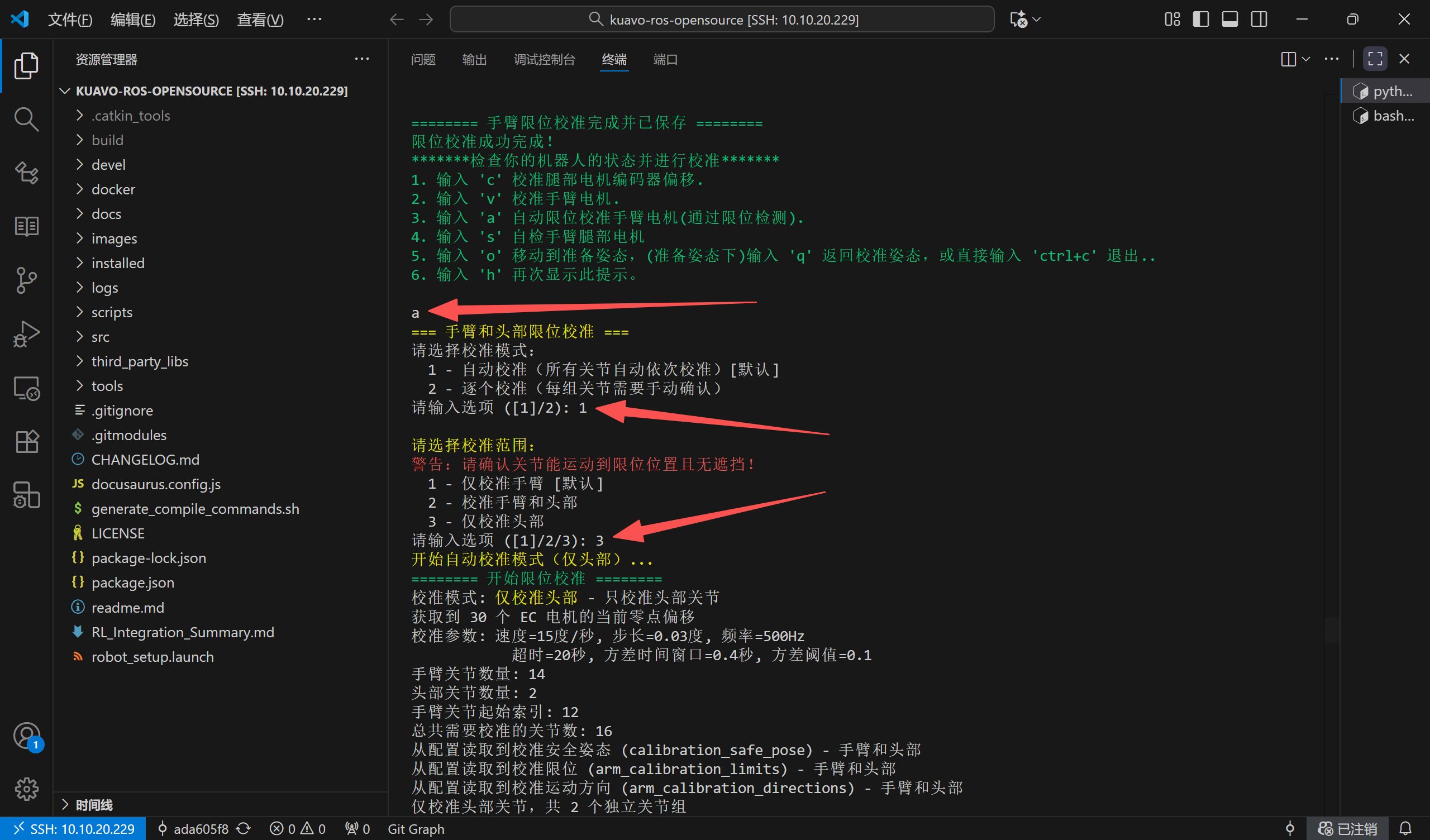
等待机器人头部标定完成并复位,终端会弹出提示,按
s并回车即可保存头部零点。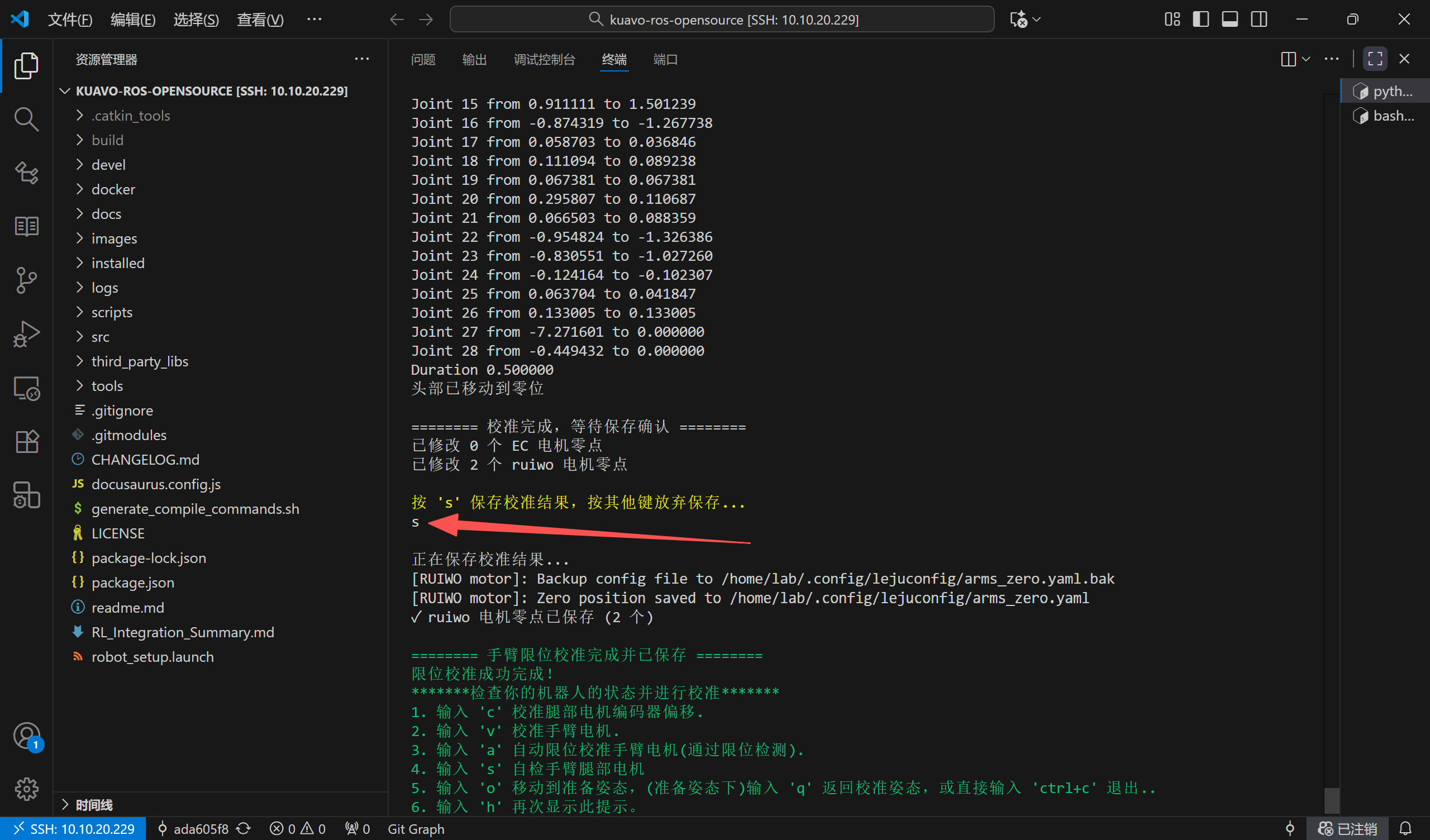
移位机上拉至机器人两侧挂绳绷直,然后按
Ctrl+C关闭此终端。至此头部和手臂标定结束,之后正常使用机器人即可。
摆正标定
将机器人手臂手动摆正(摆到期望的零位姿态),随后运行下列命令,程序会自动记录当前位置作为手臂零点:
cd ~/kuavo-ros-opensource
sudo su
source devel/setup.bash
# 以校准模式启动
roslaunch humanoid_controllers load_kuavo_real.launch cali:=true cali_arm:=true
说明:该模式下程序不会驱动手臂运动,启动后即自动读取并保存当前摆正位姿为零点,同样等到以下界面出现了按 q 并回车退出程序即可。
Kuavo 5代零点标定
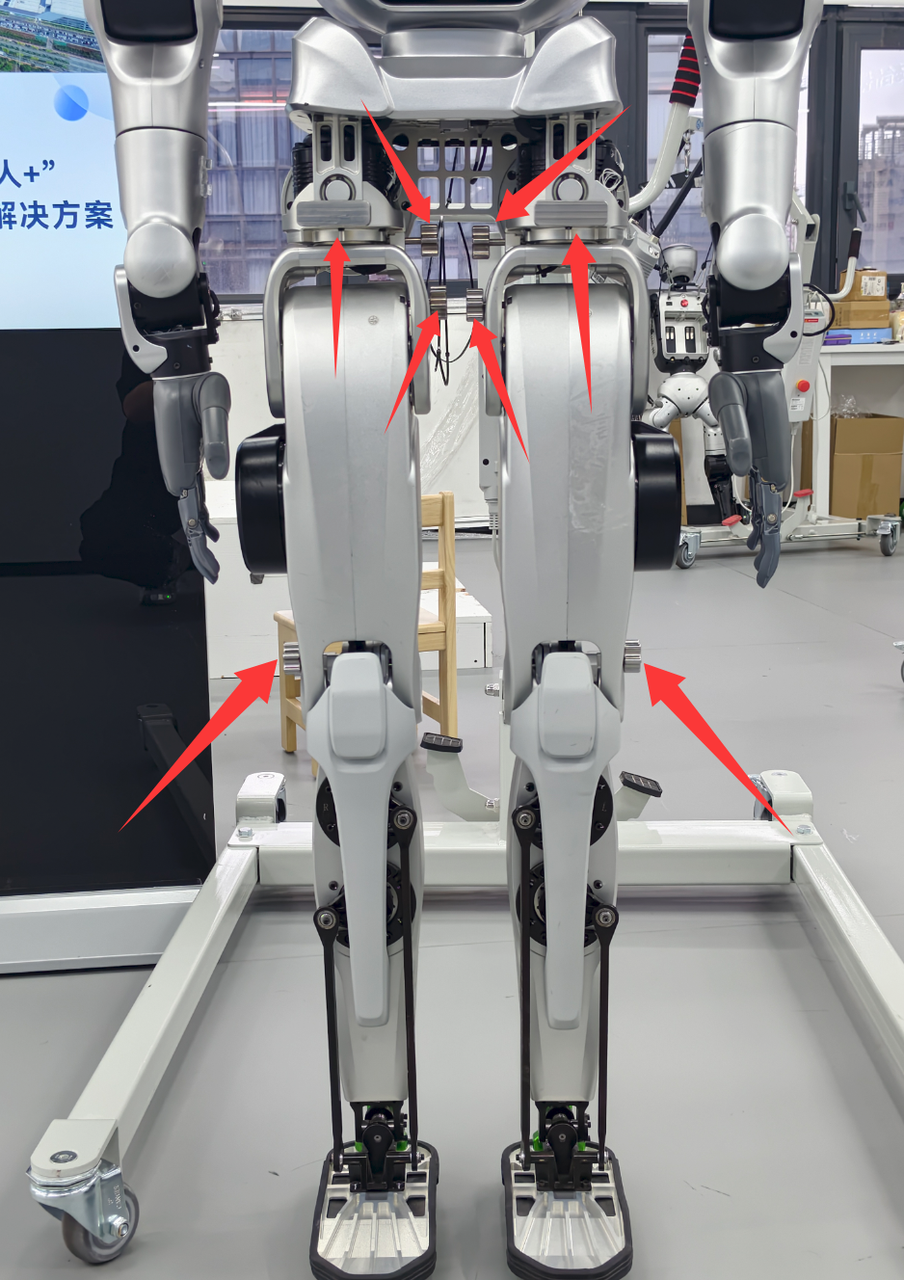
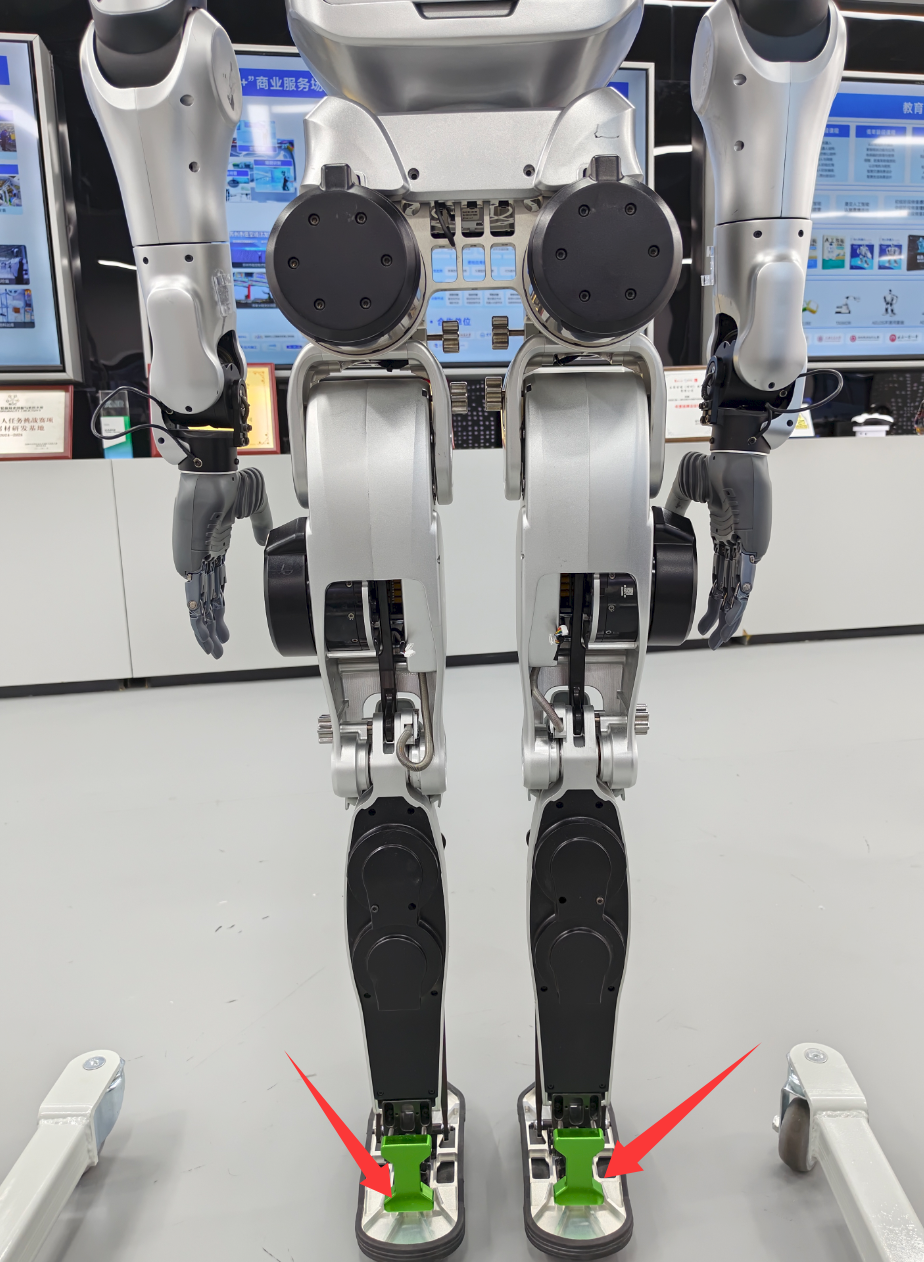
1.插入工装
正面
背面
2.启动标定
将手臂和腰部摆正后,确认工装已经正确插入。
启动机器人校准程序,依次执行以下命令:
cd ~/kuavo-ros-opensource
sudo su
source devel/setup.bash
roslaunch humanoid_controllers load_kuavo_real.launch cali:=true cali_leg:=true cali_arm:=true
- 按照下列步骤完成零点标定:
- 在终端中,看到提示后,键盘输入
c然后按Enter,以保存当前零点位置。 - 确认收到保存成功的提示信息。
- 再输入
q并按Enter,退出标定程序。
- 在终端中,看到提示后,键盘输入
- 标定完成后,可关闭终端,拔出工装。此时,零点标定已完成。